
What is DNS? Follow a website name to its address
A website name is not a page. Follow a browser’s journey, see what DNS actually does, and learn why a DNS change can take time to appear.
On this page
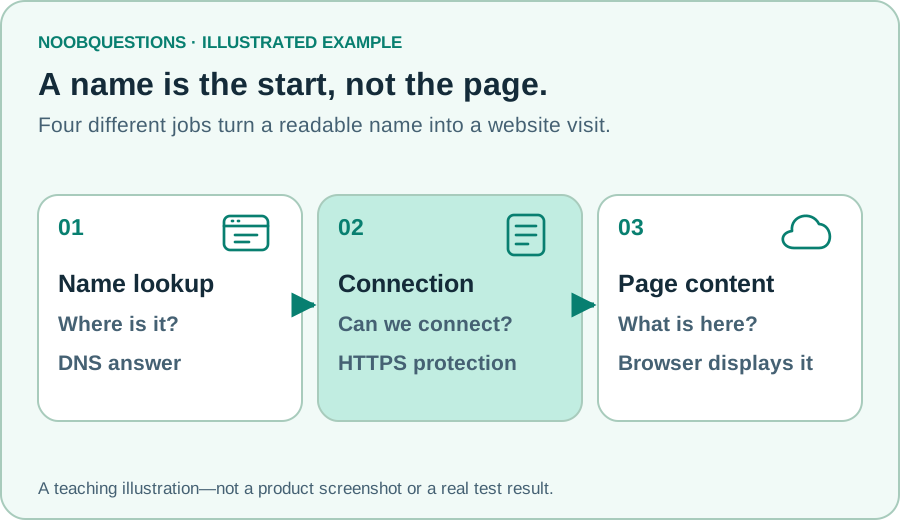
In a few minutes: Separate the website name, address lookup, protected connection, and page download—four different jobs.
Start with a name, not a number
Imagine opening a café’s website. You remember its name, not the address of the computer serving its menu. That is a useful starting point for DNS: it helps software find information associated with a name.
DNS stands for Domain Name System. For an ordinary website visit, one useful answer is an IP address—a network address the browser can use when connecting. A domain name is the readable label, such as example.com. The page itself is a separate thing. A successful lookup does not mean the menu has downloaded yet. MDN explains the relationship between domains and addresses.
Think of finding a building’s address before travelling there. The directory does not cook your lunch or decide whether the café is good. It only helps you work out where to go. The analogy is imperfect: one name may lead to several addresses, and many websites can share infrastructure.
Try it: four jobs in one visit
Use the next button below. Before each click, guess whether the browser is finding an address, protecting a connection, or receiving content. At the last step, go back once: the protection step and the page-display step should feel different.
The names in the exercise are reserved examples. It never looks them up or contacts a server. It is a picture of the process, not a report about your connection.
You type a name. What happens next?
A website name is easy for us to remember. Your browser still needs to find where to send its request.
Simplified first-visit model. Browsers may reuse DNS answers and connections; real pages fetch many files. No lookup or connection is performed.
Who answers the question?
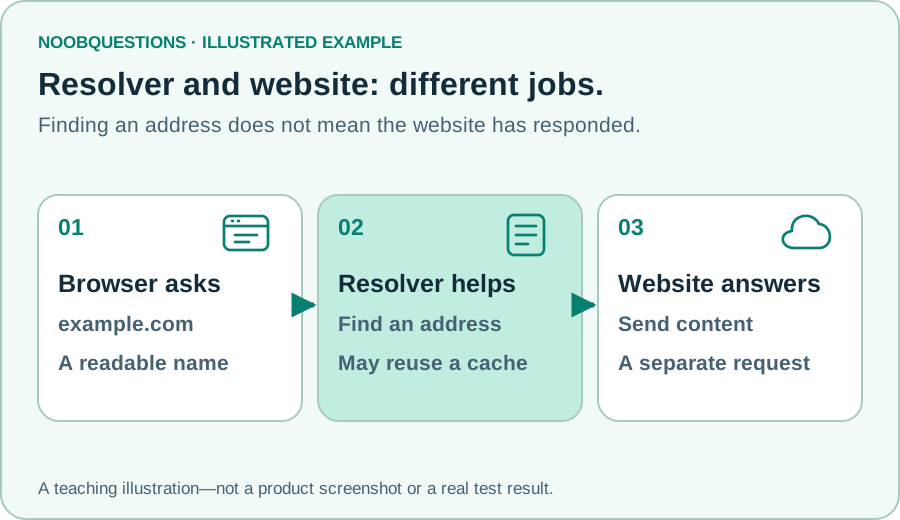
A resolver is the service that helps obtain a DNS answer. An authoritative DNS service holds the records for a particular domain. Often an answer is already remembered by a cache, so the whole lookup chain does not happen again on every visit.
You do not need to memorize every DNS server to understand the distinction. Ask two questions: “Which address did this name resolve to?” and “Did the website respond at that address?” They investigate different parts of a failure.
DNS also has record types for other jobs, including mail routing and domain verification. Changing a website’s address record is not the same as moving email. Avoid editing records just because you do not recognize their names.
Why an address change can look inconsistent
Suppose the café moves its website to new hosting. One device remembers an earlier DNS answer while another obtains the newer answer. They can temporarily reach different destinations without either device inventing a result.
DNS records have a time-to-live, or TTL, that helps govern cached reuse. That does not provide a universal countdown for every hosting, browser, certificate, or CDN change. Keep the old service available during a planned transition until the actual checks are complete.
If a site will not open, first note the exact error. “Name not found,” a connection timeout, a certificate warning, and a page saying “not found” are not interchangeable. Trying an unrelated DNS edit can make diagnosis harder.
A quick check
DNS found an address. What does that tell you?
Pick an answer. You can try again.
A useful next question
Why can the right website still show an old page? That is a different kind of saved answer. Try the cache experiment next. For a guided overview without the article, revisit the website journey in the Learning Lab.
Keep one sentence from this guide: DNS helps find where to connect; it does not fetch the page or judge what the page says.
About this resource · sources, dates & scope
Attribution: noobquestions Editorial. Original publication: . Recorded revision: .
An original AI-assisted teaching lesson. Illustrations and models simplify the concept; they are not screenshots or proof of a deployed system.
AI-assisted · Original teaching scenarios; primary references checked October 2, 2026. Exercises are local models, not verified production deployments.
Community discussion
Comments
Ask a question or share a practical note. Comments publish immediately after verification and spam checks. Do not post personal or confidential information.
Loading comments…