
Why is this page still old? Web caching explained
Change a pretend page and watch its saved copy stay behind. Learn freshness, revalidation, and why refreshing is not always the same as fetching the original.
On this page
In a few minutes: Understand a saved copy, reproduce a stale-looking page safely, and separate a cache issue from missing content.
A cache is a copy kept for later
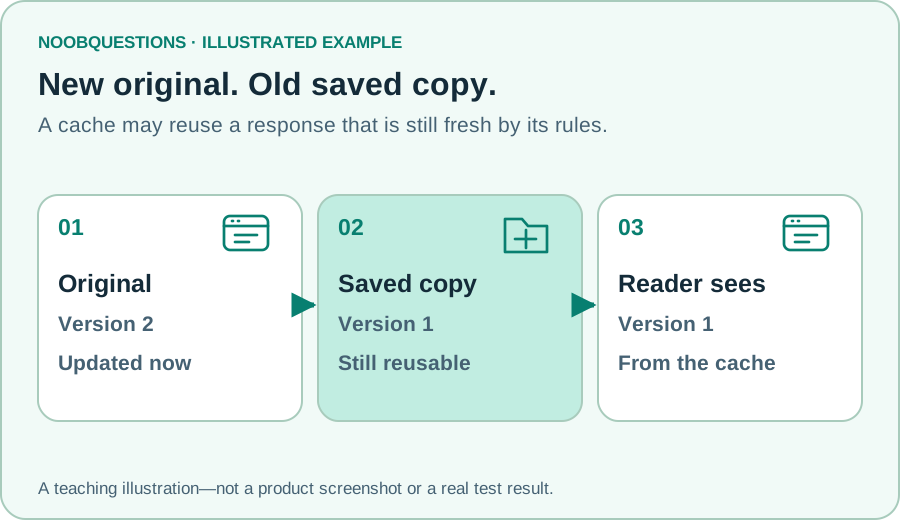
You open a café menu, then return a moment later. Downloading the same information again may be unnecessary. A cache keeps a reusable copy so a later request can be answered more efficiently.
That copy can be in a browser or in shared infrastructure between the browser and the original server. These are different places, not a single “cache” switch. An update to the original does not magically rewrite every saved copy.
HTTP caching uses rules communicated in headers. Freshness describes whether a stored response can still be reused under those rules. It does not mean somebody compared its words against the original a second ago. MDN’s caching guide explains freshness and validation.
Try it: update the original, not the copy
Load the pretend page once. Then select “Update original” and load again. The original becomes version 2 while the reader can still receive version 1. There is no bug in the exercise: the stored copy is still within its pretend 30-second freshness window.
Wait twice, then load again. Now the model checks the original and updates its saved version. “Wait” advances an imaginary clock immediately; you do not need to sit here for 30 real seconds.
Start by loading the page. Where do you think the copy will come from?
Try this: load → update original → load again → wait twice → load.
One cache and a pretend clock. Real caching follows headers and validation rules.
Stale does not automatically mean broken
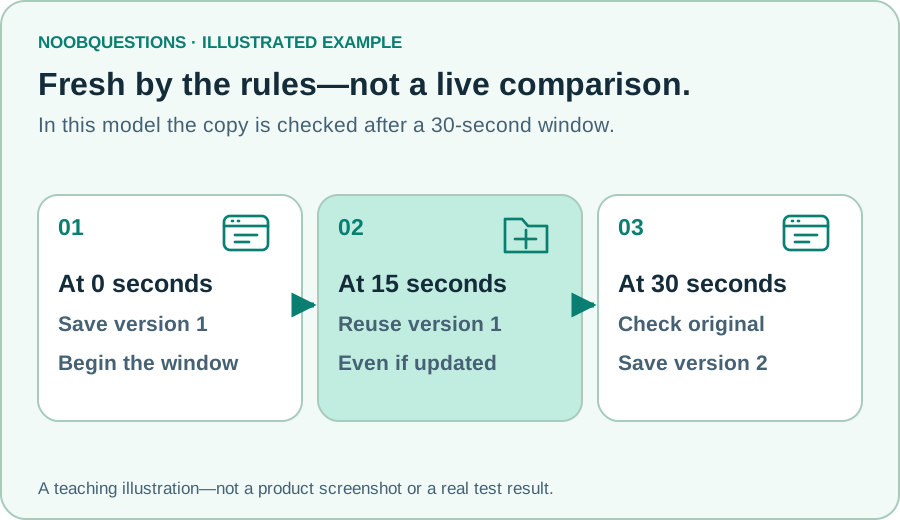
In caching terminology, a stale response has passed its freshness window. It might contain exactly the same content as the original. A cache can ask whether it has changed rather than always download a full replacement.
Our exercise deliberately shows just one path: check the original before reusing a stale copy. Real configurations can permit stale responses in specific circumstances. Multiple cache layers, private content, and service workers are left out of this model.
Notice the reversal: version 1 can be fresh by the cache’s rules while looking old to someone who knows version 2 exists. That is why “fresh” should not be read as “the latest editorial content.”
When you are the reader—or the site owner
As a reader, compare the exact page address and note when the update appeared elsewhere. A reload can help, but it is not proof that every shared cache was bypassed. Do not disable security protections to force a refresh.
As a site owner, check that the new file reached the intended origin before clearing caches. Purging a cache cannot publish a file that was never uploaded. Then examine the affected response’s caching headers and the specific delivery layer.
Prefer deliberately versioned asset URLs for changed CSS or JavaScript, paired with appropriate caching rules. Keep normal pages discoverable at their established addresses. Blanket “cache everything forever” is particularly risky for personalized pages.
This guide does not prescribe a production freshness value. A news headline, a logo, and a private account page have different needs.
A quick check
You updated the original. Why does a reader still see version 1?
Pick an answer. You can try again.
Connect it to the bigger picture
A CDN can place shared copies nearer to readers; it is not identical to a browser cache. The older Cloudflare CDN guide goes further into configuration. Verify current product documentation before copying older settings.
If the browser cannot find the website at all, start with the DNS guide instead. “Old page” and “no address” describe different problems.
About this resource · sources, dates & scope
Attribution: noobquestions Editorial. Original publication: . Recorded revision: .
An original AI-assisted teaching lesson. Illustrations and models simplify the concept; they are not screenshots or proof of a deployed system.
AI-assisted · Original teaching scenarios; primary references checked October 2, 2026. Exercises are local models, not verified production deployments.
Community discussion
Comments
Ask a question or share a practical note. Comments publish immediately after verification and spam checks. Do not post personal or confidential information.
Loading comments…