
An Overview of SIEM and Log Management
Security Information and Event Management system (SIEM) software offers centralized log management and analytics.
On this page
Security Information and Event Management system (SIEM) software offers centralized log management and analytics. This article is an extension of a TryHackMe lab titled “Introduction to SIEM.” It further examines SIEM’s capabilities by providing examples.
TryHackMe Room: https://tryhackme.com/room/introtosiem
1. Common SIEM capabilities
SIEM provides various functionalities to facilitate threat management and enhance cybersecurity. It helps protect a company’s assets by providing timely alerts and anomaly detection. The following are common characteristics of SIEM software and examples of their usage.
1.1. Ticketing
SIEM facilitates ticket resolution. It provides visibility into reported issues. If an error is reported, a SOC analyst can look into it by viewing the event logs on SIEM.
1.2. Log Collection
SIEM serves as a single pane of glass. It aggregates logs from various sources. Thus, it allows system administrators and SOC analysts to perform duties by looking at a centralized dashboard rather than finding logs by logging into each network device or host. Through log collection and archival, SIEM provides audit trails for user activity, change of privileges, system events, etc.
1.3. Knowledge Base
The reports generated in SIEM software act as a knowledge base for a company. Knowledge base refers to documents for internal uses. SIEM facilitates the process of creating knowledge base articles as it helps support staff pinpoint the root cause of an issue. Relevant findings can be included in a knowledge base.
1.4. Research and development
SIEM provides insights regarding operational statistics. The data collected by SIEM is useful for product development. For example, data scientists can look at the peak hour of website traffic and determine ways to streamline business processes. SIEM software like Splunk provides charts such as a barchart and line chart, which makes analytics easy.
1.5. Aggregation and correlation
Logs from various sources can be aggregated and normalized in SIEM to reduce redundancy and improve readability. Events of similar nature can be grouped so that it is easier for a SOC analyst to discover that events co-related. For example, an “interface down” event can be related to workstations being disconnected from the corporate network. Aggregating such events allow system administrators to troubleshoot the issue in a more timely manner.
1.6. Threat Intelligence
SIEM provides intel regarding potential threats. SIEM software such as Graylog can send alert emails when an abnormality is detected. If a particular pattern (e.g. cryptominer keyword) appears in the log file of an OS (e.g. /var/log/secure), there is a security concern. A SOC analyst can further investigate the issue based on the discovery by SIEM.
1.7. Reporting
SIEM simplifies and automates reporting. A Splunk user can schedule reports to be generated automatically and sent to recipients via email. A system administrator can use SIEM to send a daily report regarding login failure events to a SOC team email address. The reporting capability allows members to examine irregular patterns and investigate security threats in a systematic approach.
2. Log Sources
SIEM’s log sources come from hosts (e.g., Linux and Windows OS) or network devices (e.g. Routers, Switches, Firewalls, IDS/IPS).
Important Logs Sources: Linux
Most logs in Linux systems are stored under /var/log/ directory. Different log files are generated for OS and applications to write logs into.
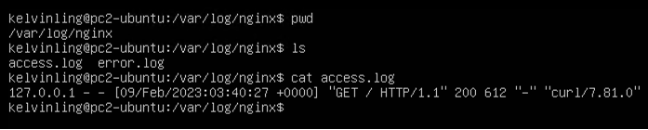
- HTTP/web server request logs: /var/log/httpd, /var/log/apache, /var/log/nginx
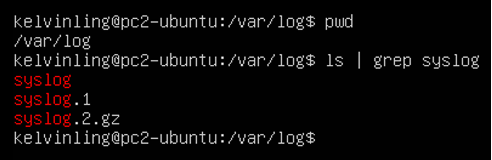
2. Corn jobs logs: /var/log/cron, /var/log/syslog
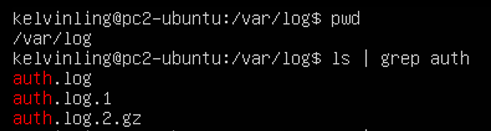
3. Linux security event logs: /var/log/auth.log, /var/log/secure
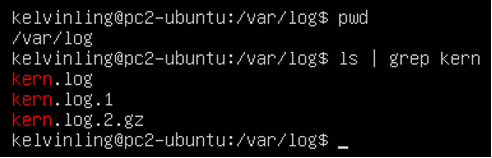
4. Kernel event logs: /var/log/kern
3. Log Ingestion — Methods of Log Collection
There are different ways for SIEM software to collect logs from remote hosts or network devices.
3.1. Agent-based Log Collection
Certain SIEM software provides a forwarder for installation on an operating system. Administrators can install Splunk Forwarder on a Windows or Linux device. The log will be forwarded to the SIEM server by the agent.
3.2. Syslog
SIEM server accepts syslog traffic (e.g., UDP 514) from clients such as network devices.
3.3. Upload Logs Manually
If it is not possible to automatically send logs to a remote server, system administrators can opt for uploading logs manually to the server. For Splunk, the logs can be in .csv format.
3.4. Port-forwarding
Sending Syslog events from an external network to the internal network is possible via port-forwarding.
About this resource · sources, dates & scope
Attribution: Kelvin Ling. Original publication: .
The original technical writing is preserved. Software-specific procedures can reflect older versions; consult current official documentation before operational use.
Community discussion
Comments
Ask a question or share a practical note. Comments publish immediately after verification and spam checks. Do not post personal or confidential information.
Loading comments…