
Investigate Cyber Attacks through OSINT
“Juicy Details” TryHackMe Room simulates the aftermath of a cyber-attack where a SOC analyst is tasked with analyzing the attack patterns from log files.
On this page
“Juicy Details” TryHackMe Room simulates the aftermath of a cyber-attack where a SOC analyst is tasked with analyzing the attack patterns from log files. An analyst needs to look at logs to investigate the root causes and sources of a cyber incident. The room is a great exercise for looking into methods to identify attack patterns — it provides three log files for analysis, namely “access.log”, “auth.log” and “vsftpd.log”. They come from a web server and a Linux operating system (e.g., /var/log/auth.log).
The following article includes the steps to identify tools adversaries use in an attack and explores the methods to identify attack patterns associated with a cyber incident using OSINT — information gathered through open-source intelligence. More specifically, names of common hacking tools gathered by GitHub community members.
TryHackMe Room — Juicy Details
https://tryhackme.com/room/juicydetails
Methods to identify attack tools from a log file
#1) Identify tools used by an attacker manually
Without a next-generation SIEM tool, it is difficult and time-consuming to identify threat tools from a text-based log file manually. However, it is possible to search for keywords in a log file to find out if a common penetration tool is detected.
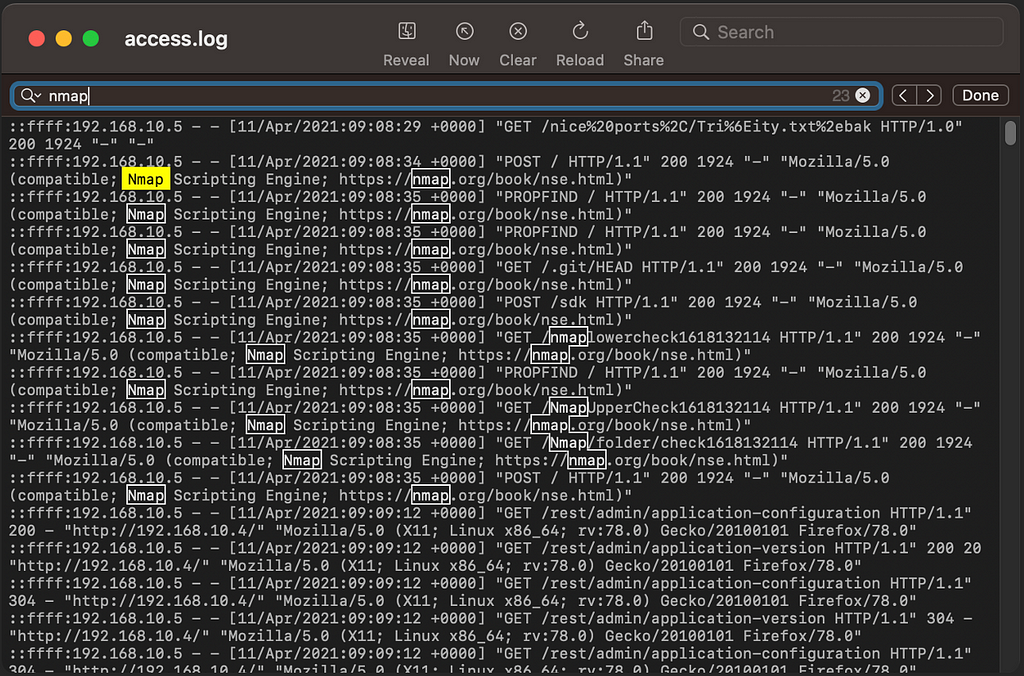
The first network scanning tool identified is Nmap. The keyword “nmap” appears in the first couple of lines in the access.log file as the user agent (client device) requesting resources from the web server. Accordingly, it is obvious to a SOC analyst that someone is trying to perform network scanning activity within the corporate network.
Using a manual approach, we identified that Nmap was the first tool used in the attack.
#2) Identify tools used by an attacker via OSINT and Excel Conditional Statement
Apart from using a manual approach, we can look for online resources regarding common attack tools hackers use. Then, we can look for such keywords on the log files. Without an advanced SIEM tool, a SOC analyst can create a conditional statement using Excel to highlight logs with matched criteria.
Step 1: Find out common attack tools using online resources. Links are provided in the reference section.
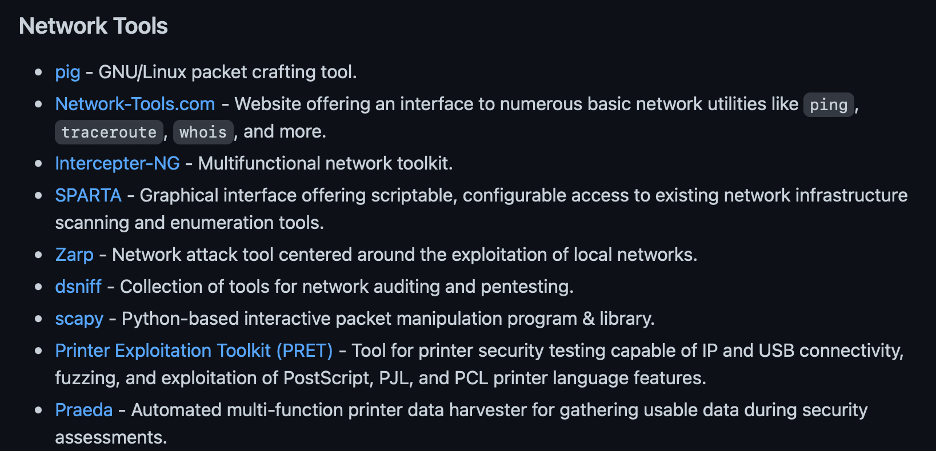
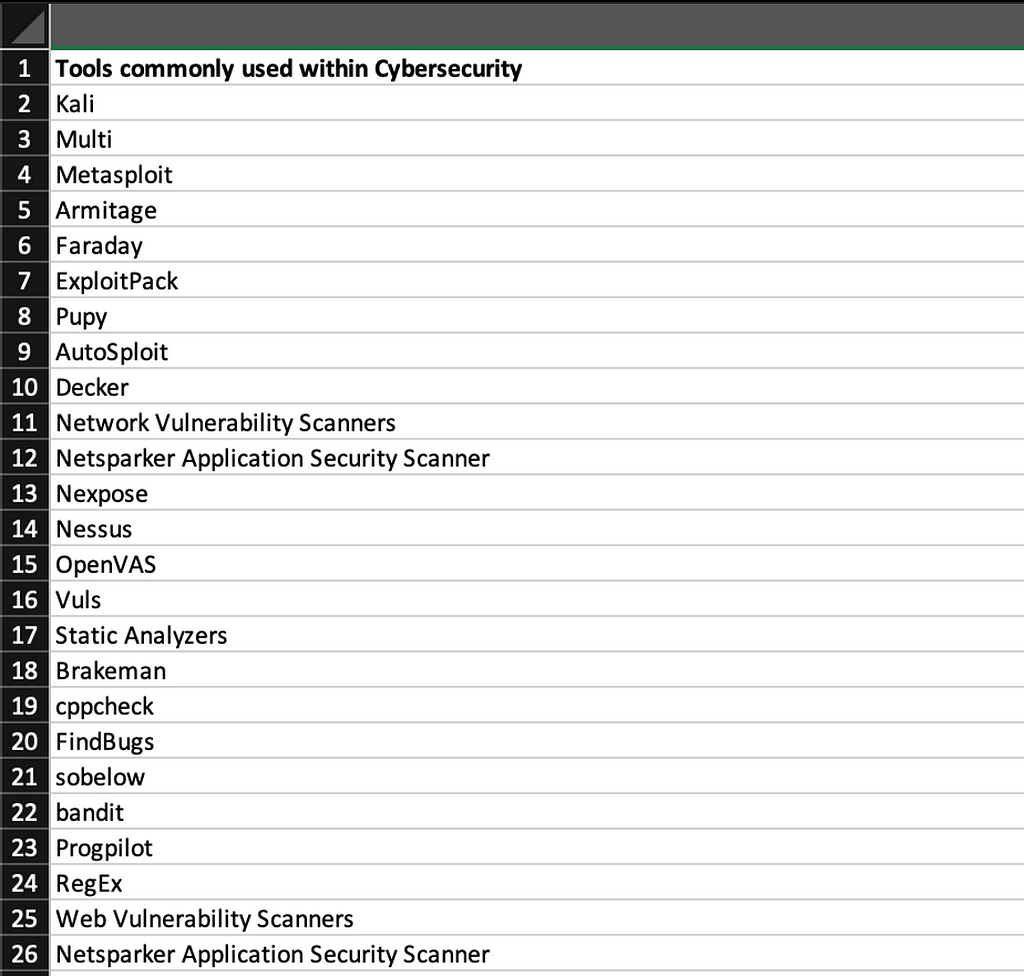
Step 2: Put all attack tool names in an Excel worksheet
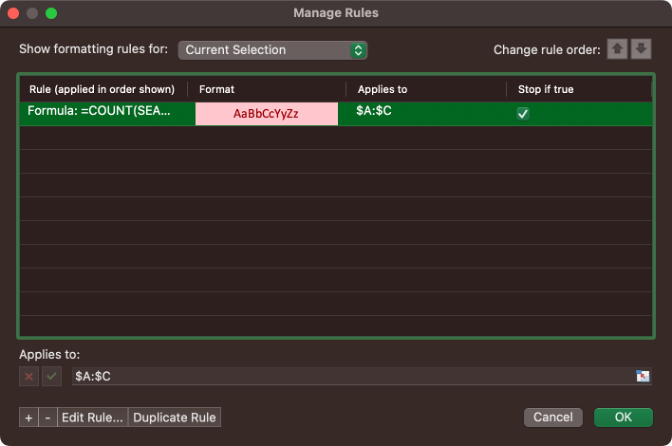
Step 3: Create a conditional statement to highlight cells which contain words that appear in the list obtained from online resources
Example: =COUNT(SEARCH(‘Attack Tools (from Github)’!$A$2:$A$1763,A1))
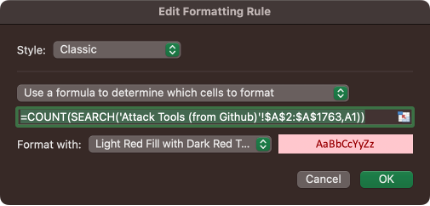
Step 4: Look for cells highlighted in red and investigate for the action performed by the suspicious user agent.
Solving “Juicy Details” TryHackMe Room using OSINT
1. Look for attack tools used by the attacker
Cells containing “Nmap” keywords are highlighted.
(Nmap is a network scanner for discovering assets/resources within a network)

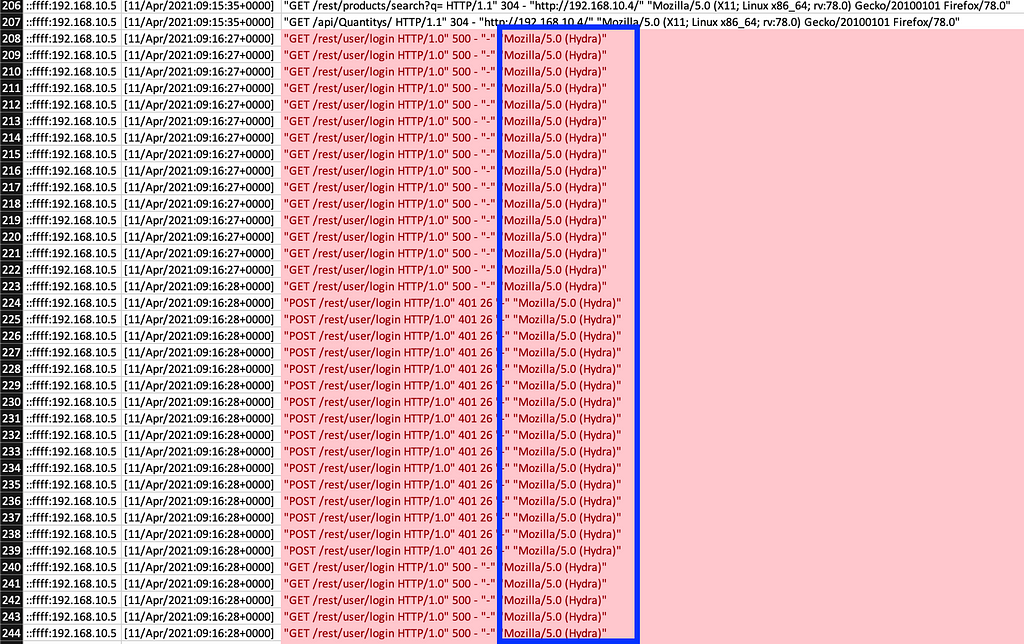
Cells containing “Hydra” keywords are highlighted.
(Hydra is a password-cracking tool.)
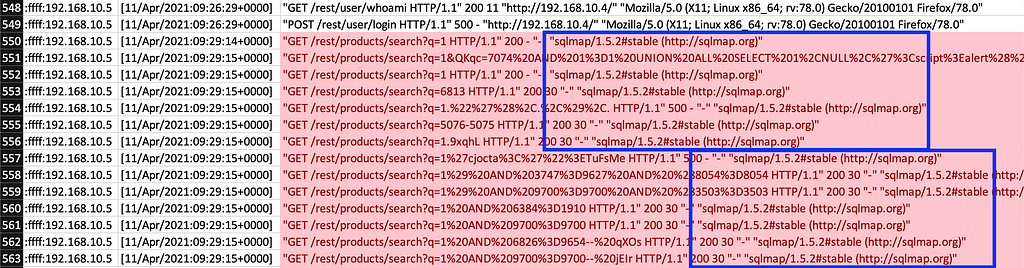
Cells containing “sqlmap” keywords are highlighted.
(SQLmap is an open-source penetration testing tool that looks for SQL injection flaws.)
Cells containing “curl” and “feroxbuster” keywords are highlighted.

(curl is used for retrieving webpage content, and Feroxbuster is a reconnaissance tool for finding hidden directories or subdomains in a web server.)
In summary, 5 tools are identified using Excel conditional statement querying from OSINT, namely #1) Namp, #2) Hydra, #3) SQLmap, #4) curl and #5) Feorxbuster.
2. Identify an endpoint that was vulnerable to a brute-force attack
As per the highlighted cell, “/rest/user/login” was frequently queried by the Hydra user agent. Therefore, that was an endpoint being attacked by the password-cracking tool.
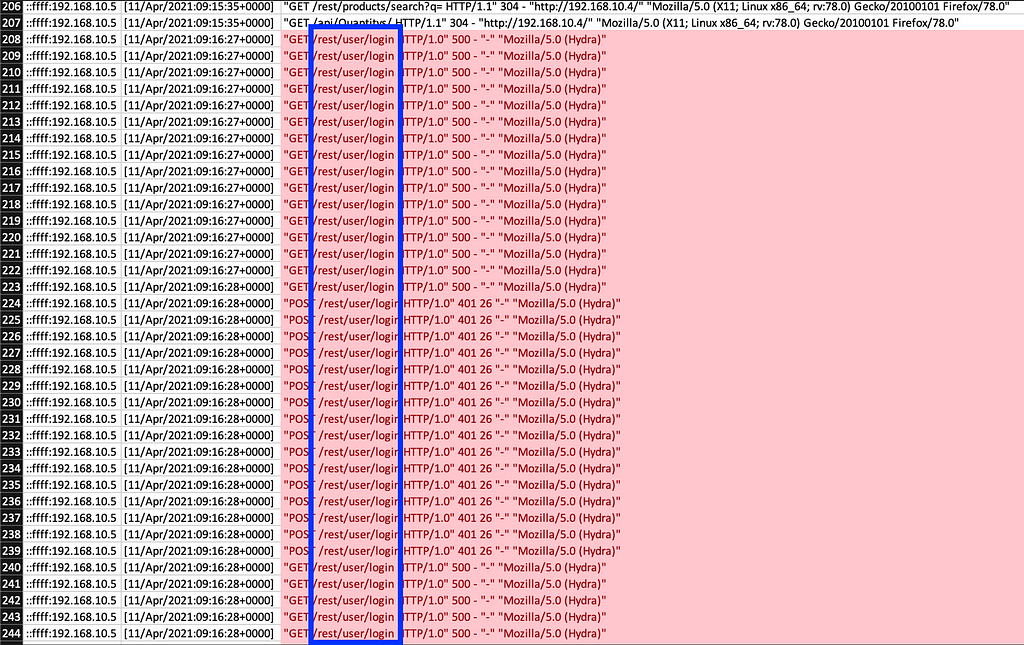
3. Identify the endpoint vulnerable to SQL injection and the parameter used
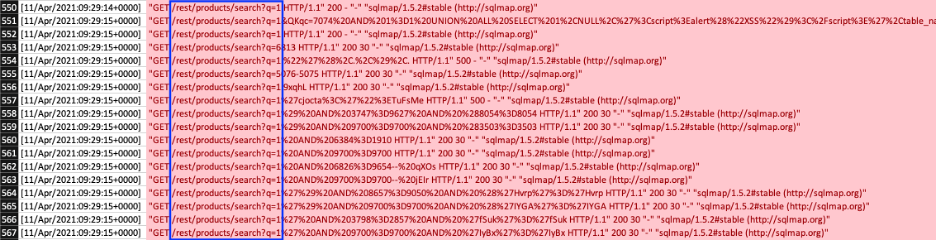
Again, from the Excel highlighted cells, it can be concluded that the endpoint “/rest/products/search” is frequently queried by SQLmap (a tool which tests for SQL injection). The query parameter is “q”.
4. Identify the endpoint that the attacker used to retrieve files
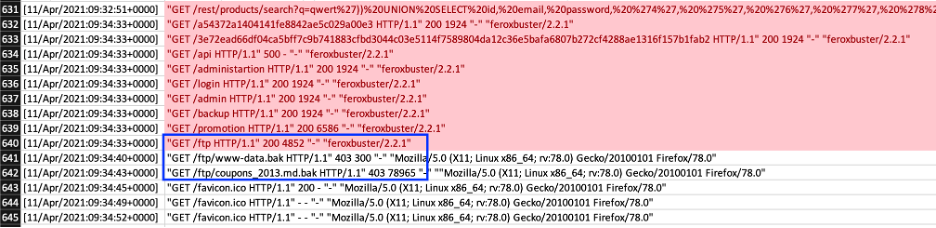
The highlighted web server records indicate that the attacker retrieved two files “www-data.bak” and “coupons_2013.md.bak” from the web server using FTP protocol.
5. Identify the website section that an attacker uses to scrape user email addresses
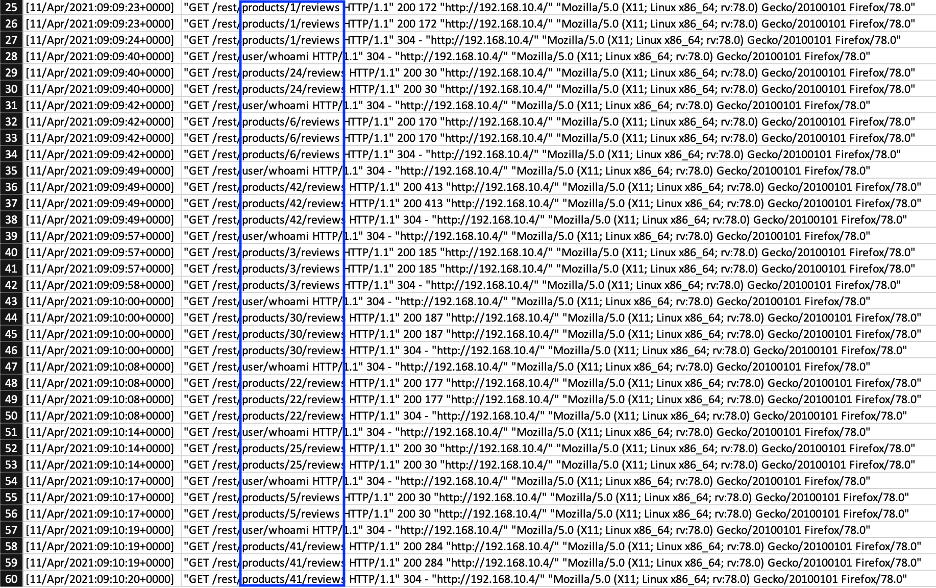
On the server access log, the directory “products/reviews” is often queried by a particular user agent. Therefore, it is reasonable to conclude that that website section is being crawled.
6. Determine if a brute-force attack is successful and look for the timestamp
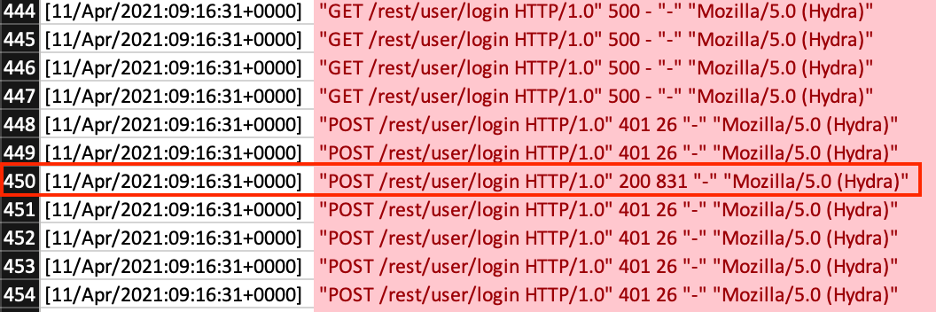
From request code 200 (OK) in the web server access log, it appeared that the attack by Hydra was successful. The timestamp is 11/Apr/2021:09:16:31+0000.
7. Identify the user information being retrieved by an attacker from the endpoint vulnerable to SQL injection
From the web server log, some SQL statements like UNION and SELECT with user agents like “curl” can be found. The targets include “id”, “email” and “password”.

8. Identify the service and account name used to retrieve files by the attacker
Looking at vsftpd.log, the following logs show that an anonymous account is being used to download content, including “www-data.bak” and “coupons_2013.md.bak” via FTP protocol.
![vsftpd.log: [FTP] connectionand “anon” user](https://cdn-images-1.medium.com/max/1024/1*SZXQkpj3WvySHnNV6b-tKQ.png)
9. Identify the service and username used to gain shell access to server
Looking at auth.log, an attacker tries to open an SSH session with user: www-data through a brute-force attack. In the end, the session can be opened.
![auth.log: [sshd] connection and “www-data” user](https://cdn-images-1.medium.com/max/1024/1*3VfF9-VmyMqrcSJEpPPfJg.png)
Conclusion
Using OSINT information and Excel conditional statements, identifying malicious activities becomes easier. With a next-generation threat intelligence (TI) tool or SIEM, identifying threats should be an automated process. It is also possible to set up criteria in a SIEM like Splunk to send out alerts when particular user agents are detected so that a SOC analyst can further investigate the issue. It is worth noting that a user agent can be spoofed. There are tools available allowing hackers to modify user agents to impersonate a legit web browser. Therefore, it is crucial to look into the sequence of actions performed by a remote user when conducting analysis.
References
Information on attack tools gathered through OSINT:
- https://github.com/cyberguideme/Tools
- https://github.com/Lifka/hacking-resources/blob/main/tools.md
- https://github.com/technicaldada/BEST-HACKING-TOOLS
- https://github.com/hahwul/WebHackersWeapons
About this resource · sources, dates & scope
Attribution: Kelvin Ling. Original publication: .
The original technical writing is preserved. Software-specific procedures can reflect older versions; consult current official documentation before operational use.
Community discussion
Comments
Ask a question or share a practical note. Comments publish immediately after verification and spam checks. Do not post personal or confidential information.
Loading comments…