
Wi-Fi or internet? Find the slowest link in a download
Move three speed sliders to find a download’s bottleneck. Learn why faster Wi-Fi may not help, and why Mb/s and MB/s are different.
On this page
In a few minutes: Find the smallest link speed, convert bits to bytes, and distinguish a learning estimate from a real speed test.
Your download has more than one link
You buy a faster Wi-Fi router, but a file still downloads at the same speed. That can be disappointing without being mysterious. The file has to cross more than the wireless link inside your home.
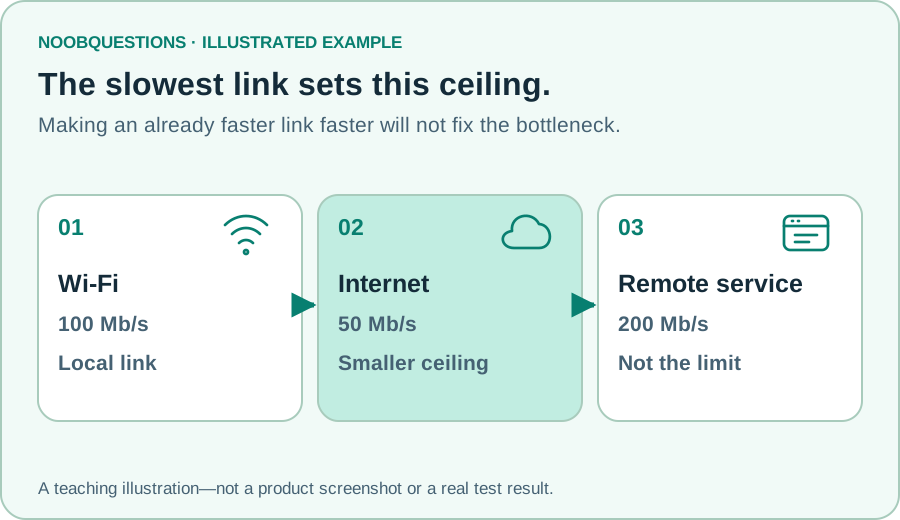
In our simplified picture, there is a remote service, an internet connection, and Wi-Fi to your device. Improving one link cannot remove a smaller ceiling imposed by another. Imagine pouring water through three joined pipes: widening the widest pipe does not widen the narrowest.
The analogy leaves out important real-world behavior. Wireless contention, protocol overhead, packet loss, the storage device, and the server’s load can all affect a real transfer. The sliders below are an explanation of a ceiling, not measurements of your equipment.
Try it: upgrade the wrong link first
Start with 100 Mb/s Wi-Fi, 50 Mb/s internet, and a 200 Mb/s remote service. Increase Wi-Fi to 300. The model’s download ceiling stays 50. Now increase the internet slider above 200: the remote service becomes the smaller ceiling.
Make two links equally slow and notice that both are highlighted. Improving only one tied link still leaves the other bottleneck. Reset whenever you want to retrace the example.
Learn by changing one thing
Find the slowest link
Three links carry a pretend 100 MB file. Change one speed and see which link limits the result.
A simplified ceiling: the smallest link speed wins. 1 byte = 8 bits; the example uses decimal MB. Time is an ideal lower bound, ignoring overhead, congestion, loss, disk speed, and latency. This is not a speed test. Inputs stay on this page; no account, file, or network is changed.
Why 100 Mb/s is not 100 MB/s
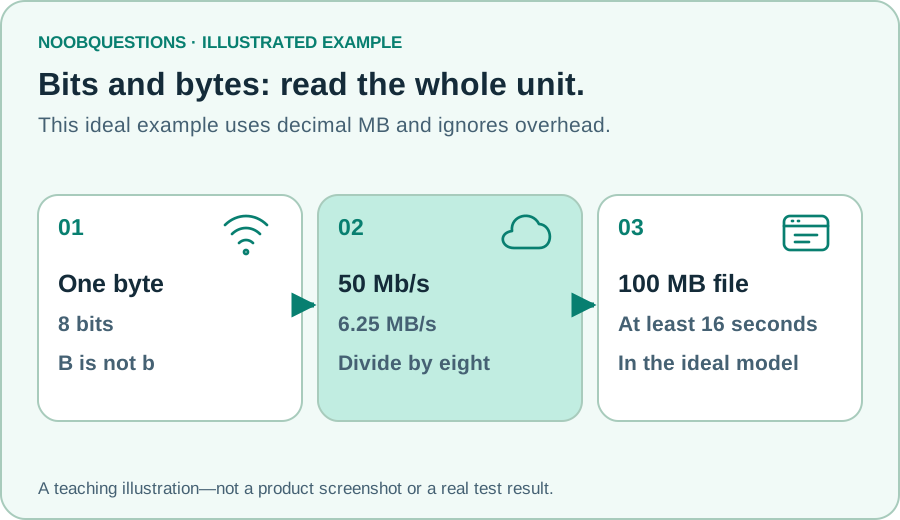
The lowercase b means bits. The uppercase B means bytes. There are eight bits in a byte, so 100 megabits per second corresponds to 12.5 megabytes per second before transfer overhead.
For this exercise, a 100 MB file contains 800 megabits. At a 50 Mb/s ceiling, dividing 800 by 50 gives an ideal 16 seconds. A real download can take longer. The model uses decimal megabytes; software that reports binary units may display a different number.
Units are easy to overlook when comparing an internet plan with a browser’s download display. Read the full unit before assuming the service delivers only an eighth of the advertised speed.
Test the question you actually have
A slow file download, a video-call delay, and weak Wi-Fi signal are not the same measurement. Throughput describes how much data moves per second. Latency describes delay. A high throughput number does not guarantee low delay or stable calls.
If you are authorized to test a network, distinguish a local-device test from a test to a remote service. They cover different paths. Note where the test begins and ends, whether it uses Wi-Fi or cable, and what else is active at the time.
ESnet’s iPerf3 documentation describes active bandwidth testing and reporting for throughput and related network behavior. Our older iPerf3 guide walks through practical examples. Only run tests on systems where you have permission; a busy test can consume meaningful capacity.
A single measurement is a snapshot, not a permanent property of a network. If you compare changes, keep the endpoint and conditions as consistent as practical. Do not buy hardware based on this pretend calculator’s result.
A quick check
Wi-Fi is 300 Mb/s and the internet link is 50 Mb/s. What is the ceiling in this model?
Pick an answer. You can try again.
One better question to ask
Instead of “is my internet slow?”, ask “which part of this path am I measuring?” That makes the next check more useful. It also prevents blaming Wi-Fi for a limit at the remote server.
If a page seems old rather than slow, that is another problem entirely. Explore the caching exercise to see how a fast saved response can still show yesterday’s content.
About this resource · sources, dates & scope
Attribution: noobquestions Editorial. Original publication: . Recorded revision: .
An original AI-assisted teaching lesson. Illustrations and models simplify the concept; they are not screenshots or proof of a deployed system.
AI-assisted · Original teaching scenarios; primary references checked October 2, 2026. Exercises are local models, not verified production deployments.
Community discussion
Comments
Ask a question or share a practical note. Comments publish immediately after verification and spam checks. Do not post personal or confidential information.
Loading comments…